Create a One-to-One Relationship
One-to-one relationships allow you to extend an existing entity with additional information that is not yet in the database model.
A common scenario is when you want to extend an entity with more attributes and it's not possible to add them to it. This happens when you are using a referenced entity from a different module, and adding more attributes don't make sense in the referenced module. In this case, you create an entity in your module to store the additional information.
To create a one-to-one relationship to an existing entity:
-
Change the
Idattribute to be the identifier of the entity you want to extend; -
Add the attributes.
Example
The GoOutWeb application allows to rate and review places like restaurants and hotels. The application saves some end-users information like the email, the phone number or Twitter account.
Since we are using the User system entity to store the end-users it is not possible to add attributes to it. We have to create an additional entity to store more information about the user. To do so, follow these steps:
- In the Data tab, open the GoOutWebDataModel entity diagram;
- If not present yet, drag the
Usersystem entity to the diagram from the Data tab; - Right-click on the diagram canvas and select "Add Entity";
- Name it
Profile; -
Rename the
Idattribute toUserId.OutSystems sets the data type to
User Identifierbased on the name given. Since this data type is the identifier of theUserentity, OutSystems creates a connection between the created entityProfileand theUserentities. -
Add the following attributes to the
Profileentity:Twitter, Text type;Facebook, Text type;Photo, Binary Data type.
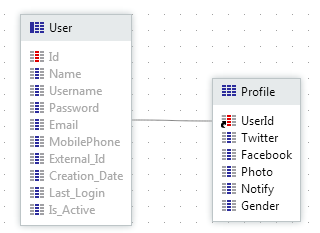
As a result, you have the Profile entity extending the User entity. Every time a Profile record is created its identifier should have the value of the User record identifier it belongs to.